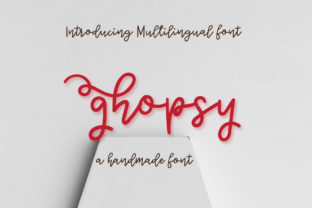
Ghopsy: A Handwritten Font for Creative and Practical Workflows
Ghopsy is a unique handwritten font that brings a playful and personal touch to digital content. Designed with a kooky and fun aesthetic, it stands out in a world dominated by sterile, sans-serif fonts. While its whimsical style might initially seem like a mere design choice, Ghopsy offers more than just visual appeal—it can be a powerful tool within various workflows, especially for those who value creativity, personality, and distinctiveness in their work.
Understanding Ghopsy’s Role in the Design Ecosystem
In the broader context of typography, Ghopsy occupies a niche that bridges the gap between formal and informal communication. Unlike traditional fonts that prioritize readability or professionalism, Ghopsy leans into character and expression. This makes it particularly useful in scenarios where tone and emotion are as important as clarity.
For instance, in branding, Ghopsy can help differentiate a company’s identity from competitors. It adds a layer of authenticity and charm that resonates with audiences looking for brands that feel real and relatable. Similarly, in marketing materials, using Ghopsy can create a memorable impression that aligns with a brand’s personality—whether it's quirky, nostalgic, or playful.
When to Use Ghopsy in Your Workflow
Ghopsy isn’t a one-size-fits-all solution, but it shines in specific contexts. Here are some situations where it fits naturally:
- Personal Projects: Whether you're designing a personal website, creating social media graphics, or crafting a newsletter, Ghopsy can add a handcrafted feel that feels more human and less machine-generated.
- Collaborative Work: In team settings, Ghopsy can serve as a unifying element in shared documents, presentations, or mood boards, helping to foster a sense of cohesion and creativity.
- Learning and Teaching: Educators and students alike can benefit from using Ghopsy in educational materials. Its approachable style can make complex topics feel more accessible, especially when paired with visual aids or storytelling elements.
- Marketing and Branding: As mentioned earlier, Ghopsy can be a strategic choice for campaigns that aim to stand out in a crowded market. It works especially well in print and digital formats that require a strong visual identity.
- Freelance and Creative Work: Freelancers who specialize in graphic design, copywriting, or content creation often need versatile tools. Ghopsy can be part of their toolkit for adding visual interest to client deliverables or personal portfolios.
How Ghopsy Integrates with Other Tools and Platforms
Ghopsy is designed to work seamlessly with a wide range of software and platforms, making it easy to incorporate into existing workflows. Whether you're using Adobe Creative Suite, Canva, Google Docs, or even Microsoft Word, Ghopsy is compatible with most text-based applications.
One of the key advantages of Ghopsy is its adaptability. It can be used alongside other fonts to create contrast and visual hierarchy. For example, pairing Ghopsy with a clean, modern sans-serif font can create a balanced look that combines playfulness with professionalism.
Additionally, Ghopsy supports multiple languages and character sets, which is particularly useful for creators working on international projects or multilingual content. This flexibility ensures that it remains a valuable asset across different industries and use cases.
Practical Implementation Tips for Using Ghopsy
Integrating Ghopsy into your workflow doesn't have to be complicated. Here are some practical tips to help you get started:
- Start Small: Begin by using Ghopsy in non-critical areas of your work, such as headers, call-to-action buttons, or decorative elements. This allows you to test its impact without committing to a full redesign.
- Ensure Readability: While Ghopsy is stylized, it's important to consider readability, especially in longer texts. Use it sparingly and pair it with legible fonts for body text.
- Use It Consistently: To maintain a cohesive brand or project identity, apply Ghopsy consistently across all relevant materials. This helps reinforce your message and builds recognition.
- Test Across Devices: Make sure that Ghopsy looks good on different screen sizes and devices. Some fonts may not render perfectly on mobile or low-resolution displays.
- Consider Accessibility: If you're using Ghopsy for public-facing content, ensure that it meets accessibility standards. Provide alternatives for users who may have difficulty reading stylized fonts.
Observations and Best Practices for Long-Term Use
While Ghopsy offers many benefits, it's important to understand its limitations and how to use it effectively over time. One of the biggest challenges is maintaining consistency without sacrificing quality. Overuse can lead to visual fatigue or a lack of focus, especially in professional environments.
To avoid this, consider setting guidelines for when and how to use Ghopsy. For example, reserve it for specific sections of a document or for certain types of content. This helps ensure that it remains a highlight rather than a distraction.
Another important consideration is compatibility with future updates. While Ghopsy is currently available through popular font providers, it's always wise to check for ongoing support and updates. This ensures that you can continue using it without interruption as your projects evolve.
Conclusion
Ghopsy is more than just a font—it's a creative tool that can enhance your workflow, add personality to your content, and help you stand out in a competitive landscape. Whether you're a designer, marketer, educator, or entrepreneur, integrating Ghopsy into your routine can bring new energy and engagement to your work.