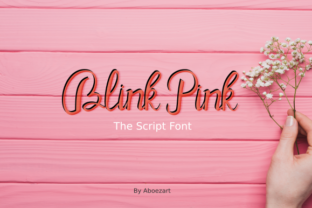
Blink Pink: A Handwritten Font That Fits Your Creative Process
Blink Pink is a carefully crafted handwritten font with a lovely charm—designed not just to look authentic, but to behave like it. It doesn’t shout. It invites. Its subtle inconsistencies—the slight variation in stroke weight, the gentle tilt of certain letters, the soft entry and exit of each curve—are intentional artifacts of human rhythm, not digital noise. That authenticity isn’t decorative; it’s functional. It helps viewers pause, connect, and remember. For professionals who rely on clarity *and* warmth—educators crafting lesson handouts, small business owners designing seasonal promotions, or freelancers building brand identities—Blink Pink bridges intention and impression without extra effort.
Where Blink Pink Fits in Real Workflows
Fonts aren’t chosen in isolation. They’re selected at decision points: when finalizing a pitch deck before a client meeting, when prepping printable workshop materials, or when refreshing a blog’s visual voice ahead of a new content series. Blink Pink enters most naturally at the *refinement stage*—after structure is set, messaging is clear, and the goal shifts from “what do we say?” to “how does it feel to receive it?”
It works especially well when contrast matters: pairing with clean sans-serifs like Inter or Lato for headings and body text, then using Blink Pink for pull quotes, callout boxes, or signature lines. That contrast supports readability while adding emotional texture. Unlike many script fonts that sacrifice legibility for flourish, Blink Pink maintains strong character recognition even at smaller sizes (14–16px), making it viable for digital interfaces—not just print posters or social graphics.
Using Blink Pink Before, During, and After a Project
Before a project: Test its compatibility early. Load Blink Pink into your design tool (Figma, Adobe Illustrator, or Canva) and check how it renders across platforms. Some OTF files behave differently in web CSS versus desktop apps—especially with ligatures or alternate glyphs. If your workflow includes web publishing, verify fallback behavior: define a graceful stack like font-family: "Blink Pink", cursive; so browsers default cleanly if the font fails to load.
During a project: Use Blink Pink deliberately—not decoratively. Assign it specific roles: only for handwritten-style annotations in Notion templates, only for teacher-signed certificates in Google Slides, or only for “hand-drawn” section dividers in editorial layouts. This builds consistency without overuse. One practical tip: create a style guide snippet that defines exactly where Blink Pink appears—and where it doesn’t. That prevents drift across team members or over time.
After a project: Audit usage. Did Blink Pink support the goal—or distract from it? Look at engagement metrics if applicable: did email subject lines using Blink Pink in preview text see higher open rates? Did workshop handouts with Blink Pink headers get more positive feedback in post-session surveys? These observations inform future decisions—not just about fonts, but about how tone and texture influence perception and action.
Integration With Common Tools and Platforms
Blink Pink works natively in most modern design and productivity tools—but integration quality varies. In Figma, install it as a local font and use it freely in prototypes and design systems. In Canva, upload it as a custom font (Pro required); once added, it behaves like any native option—just remember to embed it when exporting PDFs for print. In Google Docs or Microsoft Word, install the font system-wide first; then apply it like any other typeface. No plugins needed—but don’t expect advanced OpenType features (like contextual alternates) unless your app supports them.
For web use, host Blink Pink via @font-face. Self-hosting gives full control and avoids third-party dependencies. Pair it with font-display: swap so text remains visible during loading. Avoid using Blink Pink for full paragraphs online—stick to short, high-impact elements like headlines, testimonials, or navigation labels. This balances performance and personality.
Practical Implementation Tips
- Start small. Apply Blink Pink to one recurring element—like the “thank you” line in your email signature—before scaling to larger assets.
- Match tone to audience. It reads friendly and approachable, not formal or corporate. Ideal for wellness brands, creative studios, educators, or community-driven initiatives—but less suited for legal disclaimers or technical documentation.
- Test color contrast. Its thin strokes can fade against light backgrounds. Use tools like WebAIM’s Contrast Checker—especially if applying Blink Pink to accessible interfaces.
- Preserve spacing. Handwritten fonts often need more letter-spacing (tracking) than serif or sans-serif fonts. Try +20–40 units in design apps to avoid visual crowding.
- Keep backups organized. Store the OTF file with version notes (e.g., “Blink Pink v1.2 – includes swash capitals”) in your shared assets folder. Name exports clearly: “Blink-Pink-Web-Subset.woff2” or “Blink-Pink-Print-OTF.zip”.
Long-Term Usability and Quality Control
A font used consistently becomes part of your visual vocabulary. Blink Pink holds up well over time because its charm comes from restraint—not excess. It avoids exaggerated loops or overly dramatic flourishes that date quickly. That makes it sustainable for multi-year branding projects, ongoing course materials, or evolving product packaging.
To maintain quality control: audit usage every quarter. Pull all assets where Blink Pink appears—PDFs, social posts, website screenshots—and scan for inconsistency. Are weights uniform? Is sizing appropriate across devices? Are fallbacks working where needed? This isn’t about rigidity—it’s about ensuring the font continues to serve its purpose: reinforcing trust, warmth, and human presence.
Who Benefits Most—and How
Freelancers building portfolio sites use Blink Pink for “About Me” sections—adding personal voice without sacrificing professionalism. Small business owners apply it to limited-edition product tags or handwritten-style thank-you cards bundled with orders, deepening customer connection. Educators embed it into editable worksheet templates, helping students distinguish instructions from examples. Bloggers use it for quote graphics shared to Instagram—where authenticity stands out amid algorithmically polished feeds.
Even productivity-focused users find utility: setting Blink Pink as the font for daily journaling in Obsidian or Notion adds tactile calm to digital note-taking. It doesn’t speed up typing—but it slows down scrolling, encouraging reflection. That subtle shift matters when attention is the real bottleneck.
Final Thought: Authenticity Is a Workflow Choice
Blink Pink doesn’t automate creativity—but it reduces friction between idea and expression. When you choose it, you’re not just selecting a typeface. You’re choosing to signal care in execution, to prioritize resonance alongside clarity, and to treat typography as part of your process—not just polish applied at the end. It works because it’s designed for people who plan, iterate, ship, and learn—not for those chasing trends. So install it. Test it. Assign it one thoughtful role. Then let it do what it does best: make your work feel unmistakably, quietly, human.