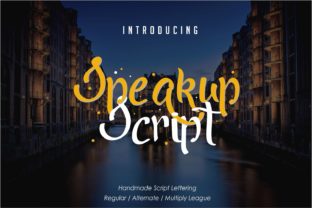
Speakup Script: Bold Handwritten Charm
There’s a quiet power in handwriting — the slight variation in line weight, the natural rhythm of connected letters, the unmistakable imprint of human intention. Speakup Script captures that energy without sacrificing clarity or versatility. It’s not just another decorative script; it’s a confident, expressive handwritten font built for real-world use — from social media posts to product packaging, classroom materials to brand identities.
What sets Speakup Script apart isn’t just its beauty — it’s its balance. Each glyph feels spontaneous and alive, yet remains highly legible at medium sizes. The contrast between thick downstrokes and delicate upstrokes adds visual interest without overwhelming the eye. And because it includes full Latin character support, standard punctuation, numerals, and thoughtful OpenType features (like contextual alternates and ligatures), it works where many playful scripts fail: in actual communication.
Where Personality Meets Purpose
Great typography doesn’t shout — it invites. Speakup Script does exactly that. Its warmth makes it ideal for projects where authenticity matters: small business branding, handmade product labels, educator newsletters, or personal blog headers. Unlike overly ornate scripts that vanish at small sizes or collapse on mobile screens, Speakup Script holds up across formats — whether you’re designing an Instagram story, a printable workshop handout, or a vinyl decal for a café window.
Its strength lies in adaptability. Pair it with a clean sans-serif (like Inter or Poppins) for contrast and hierarchy — let Speakup Script handle headlines, quotes, or callouts while your supporting type carries body text. Or go monochromatic: use varying weights of Speakup Script itself (if available in your license) to create rhythm within a single layout. That flexibility means it serves both minimalist designers and maximalist creators — no retraining required.
Creative Uses Across Real Projects
Here’s how different users are applying Speakup Script — not as decoration, but as functional design language:
- Freelancers & small business owners: Use it for logo lockups where a personal touch builds trust — think “Sarah’s Studio” on a business card or “Maple & Co.” on apothecary jars. Keep the rest of the identity grounded with neutral type and restrained color palettes so Speakup Script shines without competing.
- Educators & trainers: Apply it to slide headers, worksheet titles, or classroom posters. Students respond more warmly to materials that feel intentionally crafted — not templated. A Speakup Script title like “Your Turn to Share!” feels encouraging, not intimidating.
- Bloggers & content creators: Replace generic quote graphics with custom pull quotes set in Speakup Script. Even better: use it consistently for recurring elements — like “Tip” or “Try This” callouts — to build visual recognition across posts.
- Hobbyists & makers: Print greeting cards, embroidery patterns, or recipe cards with Speakup Script headings. Its organic flow complements tactile, hands-on crafts — and when digitized thoughtfully, it avoids looking “too perfect” next to watercolor backgrounds or textured paper scans.
Keeping It Clear and Consistent
Handwritten fonts can easily tip into illegibility or visual noise if overused. To keep results effective:
- Limit usage to one primary role per layout. Let Speakup Script introduce your headline, label your section divider, or highlight a key phrase — not all three at once.
- Test readability early and often. View your design on a phone screen at 75% zoom. If the ‘a’, ‘e’, or ‘s’ start to blur together, reduce size or increase letter spacing slightly.
- Respect context. A wedding invitation benefits from Speakup Script’s elegance; a safety manual does not. Match tone to audience expectation — don’t force personality where clarity is non-negotiable.
- Maintain typographic harmony. Avoid pairing Speakup Script with other high-contrast scripts. Choose supporting typefaces with stable x-heights and open counters — ones that won’t visually argue with its energy.
Variations That Extend Its Life
You don’t need multiple weights to get mileage from Speakup Script. Try these subtle, intentional shifts instead:
- Color control: Use it in deep charcoal instead of black for softer impact. Or try a muted terracotta or navy for brand-aligned warmth — just ensure sufficient contrast against your background (aim for at least 4.5:1 for accessibility).
- Spacing adjustments: Slightly increasing tracking (letter spacing) improves legibility in all-caps settings or tight layouts. Decreasing it — sparingly — can reinforce intimacy in short phrases like “just for you” or “made with care.”
- Layering techniques: Place a thin white stroke behind Speakup Script on dark backgrounds, or overlay a subtle grain texture at low opacity. These treatments enhance presence without compromising readability.
- Contextual swaps: If your version supports OpenType features, activate stylistic alternates for specific letters (like a swash ‘g’ or looped ‘y’) — but only where they add meaning, not distraction.
Why It Fits Your Workflow — Not the Other Way Around
Speakup Script was designed for people who value craft but respect deadlines. It installs like any standard font. It exports cleanly from Figma, Illustrator, Canva, and Affinity apps. It renders reliably in web projects using @font-face or variable font services — no SVG workarounds needed.
More importantly, it scales with your growth. Start with a simple Canva template for your Etsy shop banner. Later, bring that same voice into a full brand system — consistent across email signatures, presentation decks, and printed catalogs. Because Speakup Script behaves predictably, you spend less time troubleshooting and more time connecting.
That’s the real benefit: it removes friction between idea and execution. You don’t have to “make it look handwritten” — Speakup Script already is. You don’t have to chase trends — its confidence feels current today and will hold up two years from now. And you don’t have to choose between personality and professionalism. With thoughtful application, Speakup Script delivers both.
If you’ve ever hesitated to use a script font because it felt too fragile, too fussy, or too hard to control — this is the one worth trying. Not as a flourish, but as a voice. One that says something clear, human, and worth listening to.